 Zoho CRM Implementation
 Zoho One Consulting
 Zoho Books Setup
 Zoho Analytics & BI
 Data Migration Services
 Zoho Desk Automation
 Zoho Creator Development
 Zoho Automation Services
 Zoho Widget Development
 Zoho Extension Development
 Deluge Development
 Zoho Integration Services
 Zoho API Integration
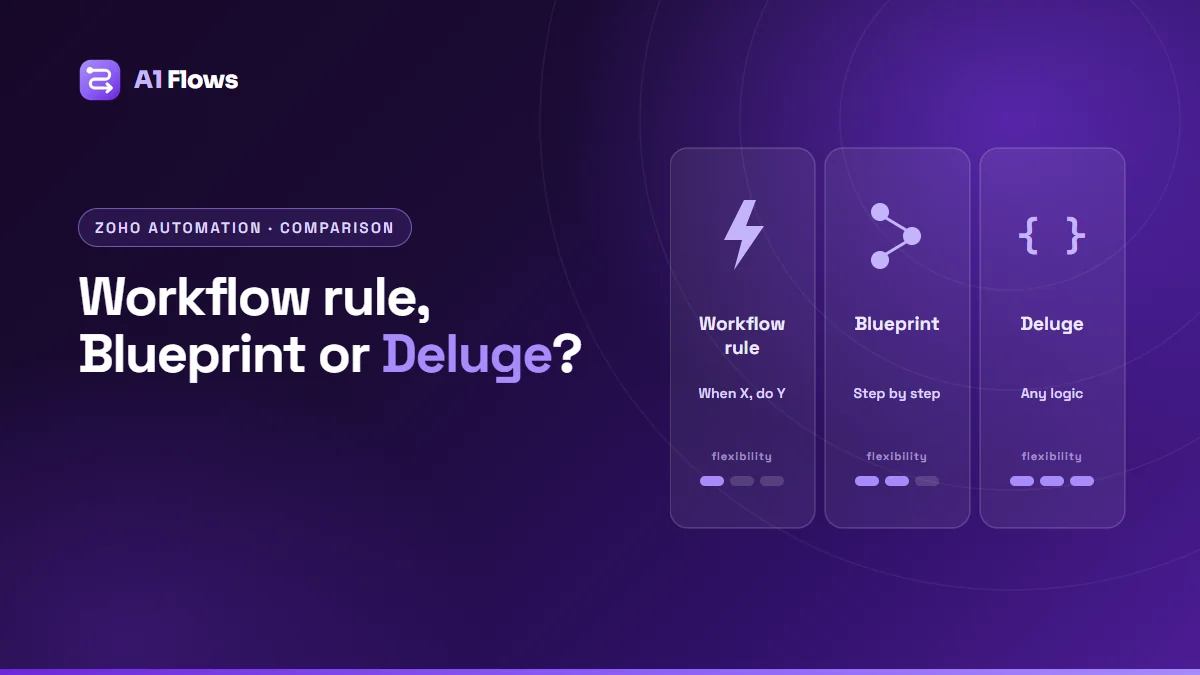
In Zoho CRM, workflow rules react to something happening to a record, Blueprints enforce the order of steps in a process, and Deluge functions handle logic that neither can express. Use workflow rules for simple “when this, do that” automation; Blueprints when the sequence matters and steps must not be skipped; Deluge when the rule needs calculations, other records or other systems. Most good setups use all three together.
This guide explains each tool, compares them side by side, and shows how to decide which to use – and when to combine them.
In this guide
- Why choosing the right tool matters
- Workflow rules
- Blueprints
- Deluge functions
- Side-by-side comparison
- How to decide
- Using them together
- Common mistakes
- Frequently asked questions
Why choosing the right tool matters
Zoho CRM gives you several ways to automate, and most problems can technically be solved with more than one. The wrong choice still works on day one. It shows up later: a process people route around because nothing enforces it, a chain of rules that trigger each other unpredictably, or a script doing something a simple setting could have done – and that only a developer can now change.
The right tool is the simplest one that fully expresses the rule, and that the person who will maintain it can understand.
Workflow rules
What they are: event-driven automation. When a record is created, edited, or reaches a date – and it matches your criteria – the rule runs its actions.
What they can do: send email notifications, create tasks, update fields, call webhooks, and run custom functions. Actions can run immediately or be scheduled relative to a date, such as three days before a renewal.
Use them for:
- Notifying the owner when a high-value deal is created.
- Creating a follow-up task when a lead’s status changes.
- Setting a field when a condition is met.
- Reminders before a date – contract renewals, follow-ups, expiries.
Limits: workflow rules react to events, but they do not stop anyone doing things in the wrong order. And their logic is limited to criteria on the record itself plus the actions on offer.
Blueprints
What they are: a process modelled as states (based on a picklist field, such as Stage) and transitions between them. Users can only move a record along the transitions you allow.
What they can do: each transition can control who may perform it and when it is available; require fields, notes or attachments while it happens; and run actions afterwards, such as field updates, emails, tasks, webhooks or functions. Blueprints can also flag records that stay in a state too long.
Use them for:
- Sales processes where a proposal must not be sent before qualification is complete.
- Onboarding, returns or claims that follow fixed steps.
- Anything where an auditor – or a manager – needs to know the steps were followed.
Limits: Blueprints make processes stricter, which is the point but also the cost. Over-engineered Blueprints frustrate users who meet a legitimate exception. Availability and limits depend on your CRM edition. Our article on streamlining processes with Zoho CRM Blueprint goes deeper.
Deluge functions
What they are: scripts written in Zoho’s built-in language, Deluge, run from workflow rules, Blueprint transitions, buttons, schedules, or called by other systems.
What they can do: anything the rule needs – read and update related records, calculate across many records, create records in other modules or apps, call external APIs, and handle errors.
Use them for:
- Calculations across related records, such as a commission across a quarter’s deals.
- Creating or updating records in another Zoho app, such as an invoice in Zoho Books.
- Calling an external system when a record changes.
- Rules with exceptions that criteria cannot express.
Limits: functions are code, so someone has to maintain them, and they run within execution and API limits that vary by product and edition. See our practical Deluge script examples for what they typically look like.
Side-by-side comparison
| Workflow rule | Blueprint | Deluge function | |
|---|---|---|---|
| Purpose | React to events | Enforce a process | Custom logic |
| Triggered by | Create, edit, dates | A user moving a record | Rules, transitions, buttons, schedules |
| Prevents skipped steps | No | Yes | Only if you code it |
| Reaches other records/apps | Limited | Via its actions | Yes |
| Built by | Admin | Admin | Developer |
| Maintained by | Admin | Admin | Someone who reads code |
How to decide
- Is this a reaction to something happening? Start with a workflow rule.
- Must the steps happen in a fixed order, with information captured along the way? Use a Blueprint.
- Does the rule need other records, calculations, other apps or exceptions? Add a Deluge function – called from the rule or the Blueprint, not instead of them.
- Does it span several apps with simple steps? Consider Zoho Flow.
Using them together
The strongest setups layer the tools. A typical deal process:
- A Blueprint controls the stages from qualification to won, requiring a signed proposal before the “Won” transition.
- A workflow rule notifies the account manager and creates an onboarding task when a deal is won.
- A Deluge function, called from the “Won” transition, creates the customer and invoice in Zoho Books.
Each tool does the job it is best at, and an admin can still read most of the setup without opening code.
Common mistakes
- Writing code for what a setting can do. A function that updates a field on save is harder to maintain than a workflow rule that does the same.
- Using workflow rules to imitate a process. Rules that “check” whether steps were done are fragile; a Blueprint enforces them.
- Chains of rules. Rule A updates a field that triggers rule B that triggers rule C. Hard to reason about and easy to loop.
- Blueprints with no exception path. If real work sometimes needs to skip a step, design the route for it.
- Undocumented automation. Keep a list of every rule, Blueprint and function, what triggers it, and who owns it.
Frequently asked questions
Can a Blueprint call a Deluge function?
Yes. Transitions can run functions as after-actions, which is a common way to add custom logic at a specific step.
Can workflow rules and Blueprints run on the same record?
Yes. Workflow rules still react to changes on records that are in a Blueprint. Plan them together so they do not update the same fields at cross purposes.
Do I need a developer for Zoho CRM automation?
Not for workflow rules or Blueprints, which are configured by an admin. Deluge functions need someone comfortable writing and maintaining code.
What is the difference between a Blueprint and an approval process?
An approval process holds a record until a designated approver accepts or rejects it. A Blueprint models a whole multi-step process, which can include approval-like steps among many others.
Are Blueprints available on every Zoho CRM edition?
No. Blueprints and the number of rules you can create depend on your edition. Check Zoho’s current edition comparison.
When should I use Zoho Flow instead?
When automation spans several apps, including non-Zoho ones with Flow connectors, and the logic is simple. Inside CRM, workflow rules and Blueprints are usually more direct.
How do I stop automations conflicting?
Give each outcome one owner: one rule responsible for setting a given field, one place where a given process is enforced. Document them, and review the list when adding anything new.
Choosing well
Start with the simplest tool that fully expresses the rule, use Blueprints only where order truly matters, and keep Deluge for the logic that nothing else can handle. That keeps your automation readable by the people who will look after it.
For help designing automation across Zoho apps, see our Zoho automation services, and for custom functions, our Deluge development service.