 Zoho CRM Implementation
 Zoho One Consulting
 Zoho Books Setup
 Zoho Analytics & BI
 Data Migration Services
 Zoho Desk Automation
 Zoho Creator Development
 Zoho Automation Services
 Zoho Widget Development
 Zoho Extension Development
 Deluge Development
 Zoho Integration Services
 Zoho API Integration
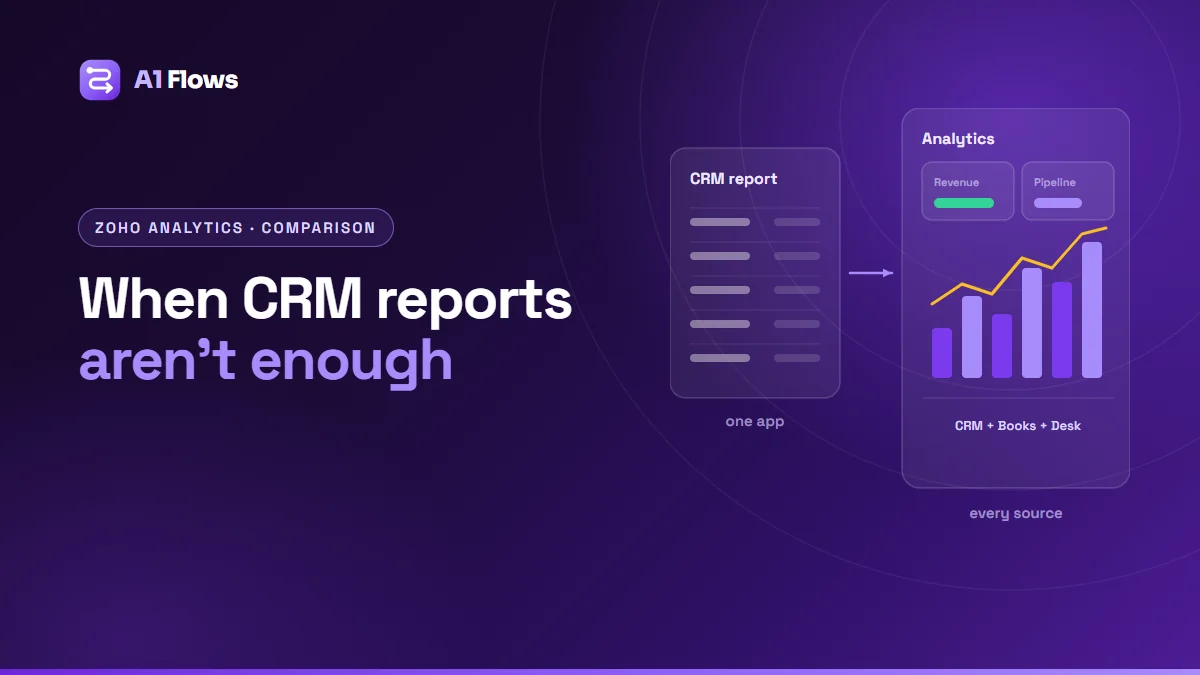
Zoho CRM’s built-in reports and dashboards are enough when your questions are about CRM data alone – pipeline, activities, conversion within the CRM. You need Zoho Analytics when a question spans several sources (CRM and Books, Desk, a marketing platform or a database), needs history the CRM does not keep, or needs calculations and visualisations the CRM report builder cannot produce.
This guide compares the two, lists the signs you have outgrown CRM reports, and explains what moving to Zoho Analytics involves.
In this guide
- What Zoho CRM reports do well
- What Zoho Analytics is
- Side-by-side comparison
- Signs you have outgrown CRM reports
- Use cases for Zoho Analytics
- How to get started, step by step
- Common mistakes
- Frequently asked questions
What Zoho CRM reports do well
Zoho CRM includes a report builder and dashboards for the data inside the CRM. You can build tabular, summary and matrix reports across a module and its related modules, group and filter them, add charts and KPIs to dashboards, and schedule reports to be emailed. For day-to-day sales management, that covers a great deal:
- Pipeline by stage, owner and expected close date.
- Activities and follow-ups by rep.
- Lead sources and conversion within CRM.
- Deals won and lost over a period.
Built-in reports are fast to create, need no extra licence, and always show live CRM data. If they answer your questions, there is no reason to add anything.
What Zoho Analytics is
Zoho Analytics is Zoho’s separate business intelligence platform. It imports data from Zoho apps through built-in connectors and from many other sources – databases, spreadsheets, cloud storage and third-party business applications – and lets you join that data, model it, and build reports and dashboards across all of it.
Its strengths are combining sources, keeping history over time, richer calculations and query-based tables, a wider range of visualisations, and sharing controls that can show different people different slices of the same dashboard. Which connectors, sync frequencies and data volumes you get depends on your Analytics plan.
Side-by-side comparison
| Zoho CRM reports | Zoho Analytics | |
|---|---|---|
| Data sources | CRM modules | Many Zoho and non-Zoho sources |
| Freshness | Live | Synced on a schedule |
| Combining sources | Related CRM modules | Joins across any imported data |
| Calculations | Report-level formulas | Formulas, aggregations and query tables |
| History and trends | What CRM currently holds | Can keep snapshots over time |
| Licence | Included with CRM | Separate, or in Zoho One |
| Who builds it | CRM admin | Analyst or admin with data modelling |
Signs you have outgrown CRM reports
- Someone exports from several systems every week and combines them in a spreadsheet to produce “the numbers”.
- Sales and finance report different revenue because each counts it from its own system.
- You cannot answer “what did the pipeline look like a quarter ago?” because the CRM only holds today’s state.
- Marketing cannot connect spend to revenue because ad, campaign and deal data live in different places.
- Leadership wants one dashboard covering sales, finance, support and operations.
Use cases for Zoho Analytics
Revenue traced to its source
Joining Zoho Books invoices to the CRM deals and campaigns that produced them, so revenue – not just leads – can be attributed to channels.
Support load against account value
Combining Zoho Desk ticket data with CRM account data to see which customers generate the most support relative to their revenue.
Pipeline trends
Keeping regular snapshots of the pipeline so you can compare its shape over time, not only its current state.
Company-wide dashboards
One view for leadership across departments, with each manager seeing only their own region or team through row-level sharing.
How to get started, step by step
- Write down the questions leadership and managers actually ask, and who asks them. Dashboards built from questions get used; dashboards built from available data do not.
- Agree the definitions. What counts as revenue, a qualified lead, an active customer? Decide once, document it, and build each metric once.
- Connect the sources the questions need, starting with Zoho apps through the built-in connectors.
- Find the join keys. The data has to link – customer IDs, emails, deal references. Where it does not, cleaning comes first.
- Build the model, then a small number of dashboards for specific audiences.
- Set the sync schedule to how current each dashboard actually needs to be.
- Share by role and review usage after a month – retire what nobody opens.
Common mistakes
- Buying Analytics for questions CRM reports already answer. Check the built-in tools first.
- Thirty charts because they were possible. Build for decisions, not for completeness.
- Metrics defined differently in different dashboards. Define each once and reuse it.
- Ignoring data quality. Analytics makes inconsistent data more visible, not more accurate.
- Expecting live data. Imported data is as fresh as its last sync; set expectations accordingly.
Frequently asked questions
Is Zoho Analytics included in Zoho CRM?
No, it is a separate product, though it is included in the Zoho One bundle. Zoho CRM has its own built-in reports and dashboards.
Can Zoho Analytics combine CRM and Books data?
Yes. Both have built-in connectors, and Analytics can join their data so, for example, revenue can be analysed by deal source.
How current is the data in Zoho Analytics?
It depends on the connector and your plan’s sync options. Data is refreshed on a schedule rather than being live like CRM reports.
Can Zoho Analytics connect to non-Zoho systems?
Yes – databases, spreadsheets, cloud storage and many third-party business applications, depending on your plan.
Can different users see different data on the same dashboard?
Yes. Sharing can be restricted by user and role, including filters that limit each person to their own region, team or accounts.
Do I need a data analyst to use Zoho Analytics?
Not to view and use dashboards. Setting up the data model, joins and metric definitions benefits from someone comfortable with data, because that work decides whether the numbers can be trusted.
What affects the cost of an Analytics project?
The number of sources and how cleanly they join, the number of audiences and dashboards, and how much modelling the metrics need. Two Zoho apps for one team is small; reconciling several external sources into company-wide reporting is larger.
Making the call
If your questions live inside the CRM, use the CRM’s reports. When the questions start crossing systems or time, that is the point Analytics earns its place – and the work that matters most is agreeing what the numbers mean before building anything.
For help connecting sources and building dashboards people use, see our Zoho Analytics service.